

%20rotate(-45.000000)%20translate(-10.110913,%20-10.610913)%20'%20cx='10.1109127'%20cy='10.6109127'%20r='9'%3e%3c/circle%3e%3crect%20id='Rectangle'%20stroke='%237F8DC6'%20fill='%237F8DC6'%20transform='translate(20.293250,%2020.793250)%20rotate(-45.000000)%20translate(-20.293250,%20-20.793250)%20'%20x='18.4932504'%20y='15.3932504'%20width='3.6'%20height='10.8'%20rx='1.8'%3e%3c/rect%3e%3c/g%3e%3c/svg%3e)
'%20id='close-icon-top'%20stroke='%237F8DC6'%20stroke-width='3'%3e%3c/line%3e%3cline%20x1='3'%20y1='13.5'%20x2='23'%20y2='13.5'%20transform='rotate(-45,%2013,%2013.5)'%20id='close-icon-bottom'%20stroke='%237F8DC6'%20stroke-width='3'%3e%3c/line%3e%3c/g%3e%3c/svg%3e)
'%20stroke='%237F8DC6'%20stroke-width='2'%3e%3cg%20id='Group'%20transform='translate(131.000000,%20779.000000)'%3e%3cg%20id='icons/sep'%20transform='translate(76.500000,%204.000000)'%3e%3cline%20x1='0.5'%20y1='0'%20x2='0.5'%20y2='16'%20id='sep'%3e%3c/line%3e%3c/g%3e%3c/g%3e%3c/g%3e%3c/g%3e%3c/svg%3e)
%20scale(-1,%201)%20rotate(90.000000)%20translate(-6.500000,%20-10.500000)%20'%20points='-2%2015%206.50030075%206%2015%2015'%3e%3c/polyline%3e%3cline%20x1='18'%20y1='10.5'%20x2='2'%20y2='10.5'%20id='Path-4-Copy'%20stroke='%23222155'%20stroke-width='3'%3e%3c/line%3e%3c/g%3e%3c/svg%3e)
%20rotate(90.000000)%20translate(-13.500000,%20-10.500000)%20'%20points='5%2015%2013.5003007%206%2022%2015'%3e%3c/polyline%3e%3cline%20x1='18'%20y1='10.5'%20x2='2'%20y2='10.5'%20id='Path-4'%20stroke='%23222155'%20stroke-width='3'%3e%3c/line%3e%3c/g%3e%3c/svg%3e)
"I Ditched QWERTY, Halved My Typing Speed, and Spent a Fortune on a Glowing Keyboard—Here’s Why I’d Do It Again" -- That's what ChatGPT said when I asked it to create a title for my article.
People will be sitting in my office talking to me, and suddenly they will interrupt the conversation with a comment about my keyboard. Sure, it's kind of weird. But the reviews were good. When it didn't quite deliver on it's promises, I decided I could fix the problem by rewiring my brain. Why did I do it? And more importantly, was it worth it?
It was January of 2022. I had just finished typing my third book. All that typing was causing some fatigue and discomfort in my hands and wrists. I decided a new keyboard would fix my problems. Much later, I would recognize a pattern that I sometimes cope with stress by obsessively researching things and deciding to buy or change something in my life. So the wrist pain led me to obsessively research ergonomic keyboards. I concluded that I absolutely had to have the new Moonlander keyboard from ZSA. It differs from a "normal" keyboard in at least eight important ways:
- It glows.
- It's split in two halves.
- It's smaller than the average keyboard (76 keys instead of 101+)
- It slopes at an angle (a feature called "tenting").
- The keys are organized in vertical columns instead of staggered horizontal rows.
- It's mechanical.
- It's fully programmable.
- It's eye-wateringly expensive.
The Moonlander costs almost nearly twice as much as I thought I would ever spend on a good keyboard. There were far cheaper ergonomic options on the market, but this one was obviously going to change my life, because that's what the reviews all said. And I had money from my Patrons (thank you, Patrons!). I clicked "Buy Now" and a couple weeks later, this beauty arrived straight from the factory in Taiwan.
From Wrist Pain to All Kinds of Pains
It was glorious to look at... and almost impossible to use. Besides the glowing, which never affected my typing, every single thing on the list above took time to get used to. Mechanical keyboards have tiny switches in every key. You can feel them "trip" when you push them, so you don't have to push them all the way down. I was used to membrane keyboards where you have to push each key almost to the bottom to make it trigger. I had to train myself to type softer.
I was used to a big, flat keyboard where all the keys were right in front of me. My hands had learned to jump around to all the locations where the keys are. But this one had fewer keys. There was no easy place to put arrow keys. Backspace? Enter? Tab? Delete? Everything needed a new location.
Speaking of locations, my fingers were trained to move diagonally to find keys staggered on other rows. These keys aren't staggered. Every time I tried to find a key, my fingers were off by a little bit. All these things together made for a learning curve that was more like running into a wall.
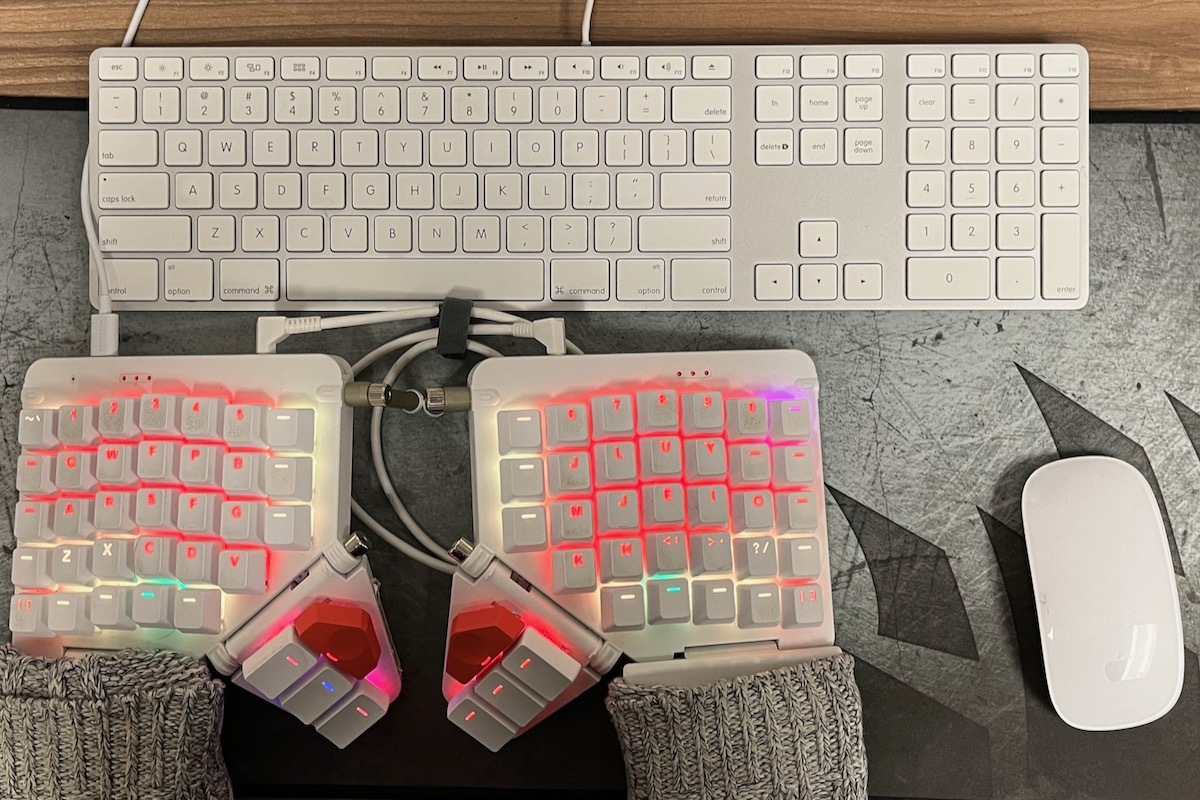
The Only Thing That Would Make This Situation Worse...
I spent a month or so fooling around with it, creating and tweaking a layout where I could find all the keys I needed. And then I decided to do the one thing that would make it all way more difficult: I decided to learn an entirely new keyboard layout. When Mavis Beacon taught me typing 30 years ago, I picked QWERTY instead of Dvorak as my layout. I'd been using QWERTY ever since. If you Google "alternative keyboard layouts", you can go down quite a rabbit hole. YouTube videos and articles had me convinced that some other layout would be a big improvement. Since I was having to re-learn the spacing and positions of keys, I figured I had a golden opportunity to learn a new layout.
I picked an obscure alternative layout that a YouTuber recommended. Immediately, my typing skills went down the toilet. I went from nearly 90 words-per-minute to hunting and pecking out 10 words a minute with every letter taking three tries. It was brutal. I started using dictation to type emails. Surprisingly, my brain picked up the new layout in just two or three months. A year and a half went by and I had plateaued at 50-ish words-per-minute. I put all that work in and came out slower. Had I changed too much? Trusted the wrong YouTubers? Should I just go back to my old keyboard? Was this whole adventure a big mistake?
Bad Idea. Do It Again.
Then I had a great idea... change my keyboard layout again! There were other alternative layouts that were more mainstream. Colemak promised to improve on QWERTY without changing too much. This time, I took advantage of the programmable keyboard feature. I could open the app and move a letter to any key. I rearranged a few keys at a time. As soon as the typos went down, I would make more swaps. Each swap improved on frustrations from my past layout. In a couple months I was fully switched over to Colemak-DH. Another year and a half went by. I was up to only 60 WPM. It turns out that speed is more than just a good layout. Speed comes as you commit whole word patterns to muscle memory. It might take years to get back to my old QWERTY speeds.
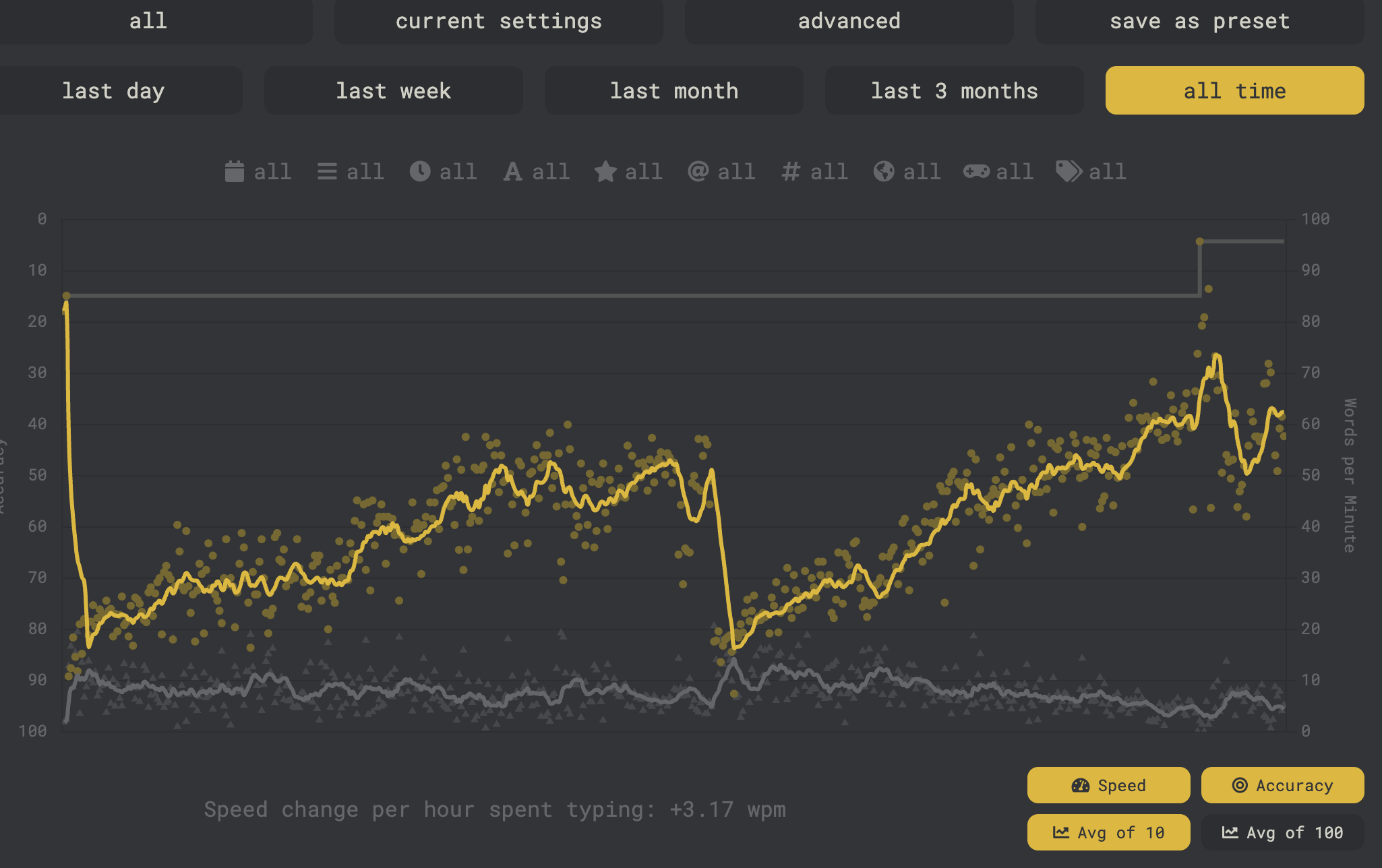
Can You Still Type on a Normal Keyboard?
At first it was murder. Every key was wrong. But if I looked down at the keyboard while I was typing, my eyes helped me remember where the keys were. After a few stints using a QWERTY Bluetooth keyboard and a laptop, I was able to reconnect some of the pathways. I can type about 30 WPM on a standard QWERTY board. I could probably type much faster if I practiced it regularly. So yes, my fingers and brain are adapted to two completely different layouts.
Would you recommend learning a new Keyboard Layout?
I settled on Colemak-DH and I'm very happy with it. I don't see myself ever going back.
If you are only looking to type faster, just practice more. Spend 15 minutes a day on typing apps. I would recommend Keybr.com and MonkeyType for beginning typists and TypeRacer and typ.ing for more advanced users. Some typing games like Keyboard Ninja and a Zombie game are good for testing your skills.
Alternate keyboard layouts do not improve your speed. Many of the world's top speed-typists use QWERTY all the time. Alternate layouts can reduce hand motion and finger fatigue and improve comfort. I suspect that the staggered keys work better with QWERTY. It's like the strange finger motions improve the strange letter locations. If you want to keep typing on a staggered keyboard, you should also stick to QWERTY. Practice more often and your speed will improve. Consider ergonomic keyboards that use a staggered layout. You could look at the mWave or the Freestlye Pro, both by Kinesis, or the Dygma Raise 2 or the Keychron Q11. Logitech has the Wave Keys (I haven't tried any of these).
You should learn a new layout if and only if you decide to buy a columnar keyboard that is fully programmable.
I recommend switching to a new layout if, and only if, you decide to go with a full-programmable columnar keyboard like the Ergodox EZ, Moonlander or Voyager by ZSA keyboards or the Dygma Defy. Programmable means you can rearrange your layout. If you don't like a couple keys in their standard positions, you can swap them anywhere you like. That allows you to pick any layout or build your own. And the layout is saved on the keyboard so it works on any computer. Note: Programmable does not mean you can make the keyboard do anything. When you reprogram the keyboard, you are actually rearranging key codes. Your operating system receives the key codes and interprets them as letters, numbers, or symbols based on your system's keyboard and language settings. So there are limits to what the keyboard can do.
If you do decide to invest money in a better keyboard, make sure to consider these questions before you make a purchase.
And where did you put the arrow keys?
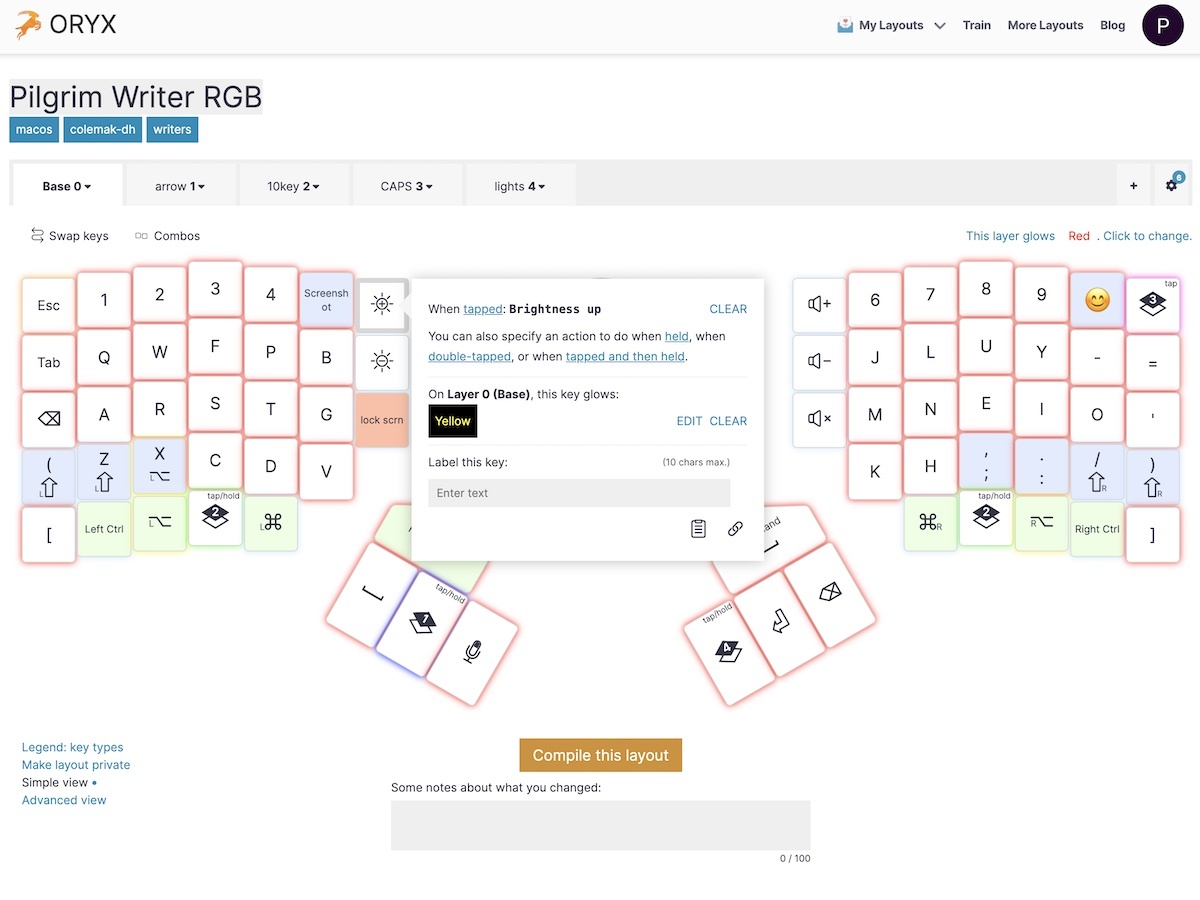
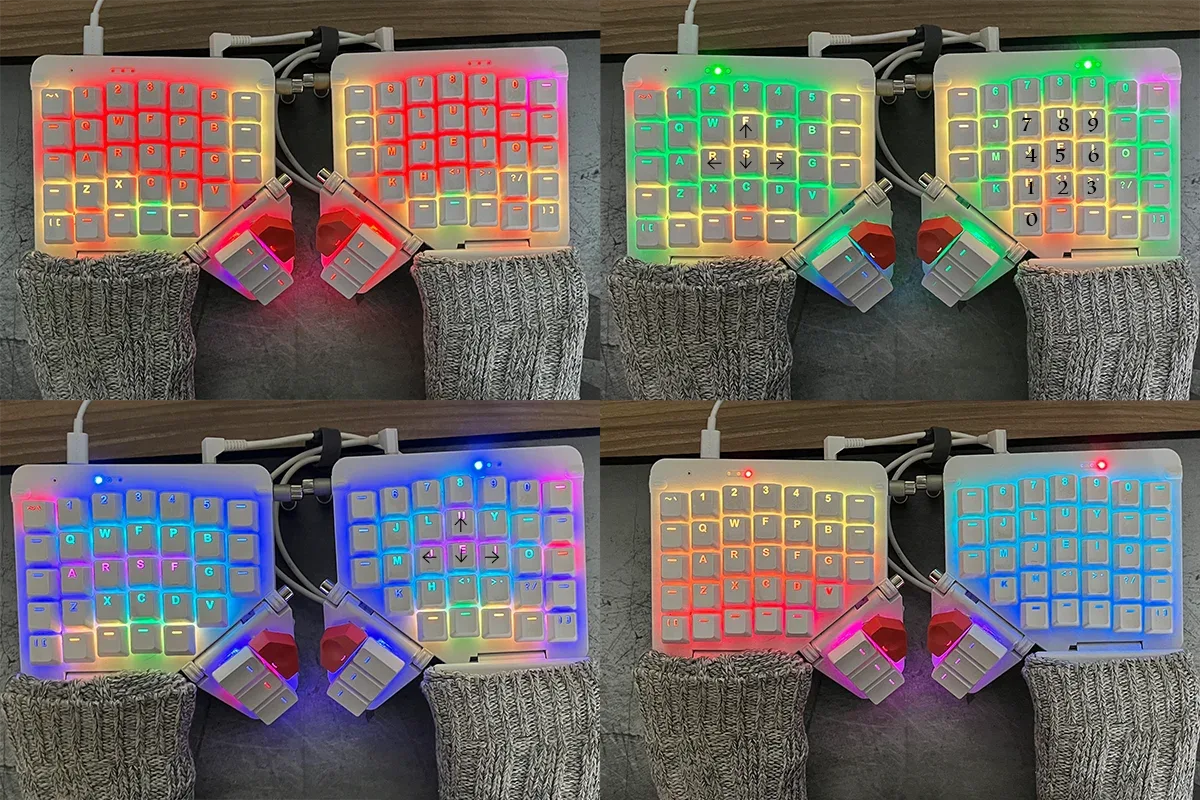
Programmable keyboards allow you to build multiple layers. I built a 10-key layer that also has arrows and symbols on my left hand side. I built a blue navigation layer that puts arrows on my right hand with the Delete key and other navigation keys like Page Up, Page Down, Home, and End. I also built a CAPS LOCK layer that is animated rainbow colors. The smaller form-factor means the mouse can sit closer to my keyboard, which significantly reduces strain. Check out my current layout here.
Why does your keyboard wear socks?
The Moonlander has built-in wrist-rests made of hard plastic. They sit too low for my hands. A sock, doubled-over, gives me both support and padding. I have other thoughts on how to improve the wrist rests but I would need to work with a 3D printer.
You type slower than you did before. Was it really worth it?
My speed continues to improve slowly. The wrist strain hasn't come back, so the outcome was good. I encourage you to read the article Keyboard Risk Factors on the Kinesis website. These issues are real; I was experiencing four out of the five on this list. And that was only because I had already addressed #3 with a more ergonomic desk (also a gift from my Patrons). Much of what we interact with on a daily basis is man-made. The fact that staggered QWERTY keyboards have been used by everyone for a long time does not mean they are a great idea. Watch this KeebMaker video to see how split, tented, columnar keyboards evolved. We need to be willing to question why we do the things we do. We can't be afraid to act differently if we find a better way to live.
In the end, I suspect that the tenting and the split features were the most helpful for my wrists. The smaller size means I don't have to reach as far for my mouse, which improved what I experienced as mouse hand strain. The mechanical, columnar, and programmable features all helped me optimize my experience and overcome the disadvantages of the small size. They also increased the learning curve. I think that my information was accurate on the quality of this keyboard but it came from people who have already been playing with mechanical and programmable keyboards for a while.
You don't have to be a writer or software developer to invest in a keyboard that makes more sense. But it's also hard for most people to justify the price-tag of a split, programmable keyboard. I hope the trend shifts in this direction and the price of entry comes down. I also hope today's post has helped you think more critically about something you probably use every day. I learned a lot of useful things in the process, but I also learned some important lessons about how researching things on the internet and watching YouTube videos can quickly build a self-reinforcing confirmation bias. I'm glad I wasn't using this method to make medical or religious decisions.
There certainly could have been cheaper and easier ways to improve my ergonomics, but In the end, I don't regret my choices. I have a powerful, elegant, and endlessly customizable ergonomic keyboard that uses open-source software and standard, off-the-shelf hardware. It should last me for many years. I put the work in to learn a better layout and now I can enjoy more comfortable typing every day for years. I wouldn’t want to go back. But I am glad I didn't realize what a big hill I had started to climb when I clicked the "Buy Now" button four years ago.

'%20stroke='%23DAB02C'%20stroke-linejoin='round'%20stroke-width='2'%3e%3cpolyline%20id='Path'%20transform='translate(12.000000,%2011.674232)%20rotate(-45.000000)%20translate(-12.000000,%20-11.674232)%20'%20points='11.3127269%202.24695917%2012%201.6742316%2015.3242117%204.44440805%2018%206.6742316%2018%2021.6742316%206%2021.6742316%206%2018.9756525'%3e%3c/polyline%3e%3c/g%3e%3cg%20id='fg-tag'%20transform='translate(9.000000,%2010.674232)%20rotate(-45.000000)%20translate(-9.000000,%20-10.674232)%20translate(3.000000,%200.674232)'%20stroke='%23DAB02C'%3e%3cpath%20d='M11,20%20L1,20%20C0.44771525,20%206.76353751e-17,19.5522847%200,19%20L0,5.46837495%20C-3.63450484e-17,5.1715951%200.13182301,4.89014749%200.3598156,4.70015367%20L5.3598156,0.533487%20C5.73066155,0.224448706%206.26933845,0.224448706%206.6401844,0.533487%20L11.6401844,4.70015367%20C11.868177,4.89014749%2012,5.1715951%2012,5.46837495%20L12,19%20C12,19.5522847%2011.5522847,20%2011,20%20Z'%20id='Path'%20stroke-width='2'%3e%3c/path%3e%3ccircle%20id='Oval'%20fill='%23DAB02C'%20cx='6'%20cy='6.3257684'%20r='2'%3e%3c/circle%3e%3c/g%3e%3c/g%3e%3c/svg%3e)
%20scale(-1,%201)%20rotate(90.000000)%20translate(-6.000000,%20-15.500000)%20'%20points='-8%2020%206.00049535%2011%2020%2020'%3e%3c/polyline%3e%3c/g%3e%3c/svg%3e)
%20rotate(90.000000)%20translate(-6.000000,%20-15.500000)%20'%20points='-8%2020%206.00049535%2011%2020%2020'%3e%3c/polyline%3e%3c/g%3e%3c/svg%3e)